NEP9 App Download Guide: Android APK, Installation Steps, and Why Mobile Players Get the Best Experience
You've landed on the NEP9 app download page. Is the app actually better than the website? Is the APK safe to install? Why isn't there an iOS version? What happens after I install it? This guide answers all of that from a player's perspective, not a marketer's.
Should You Install the NEP9 App?
Two-second decision tree based on your device and how often you play. Full breakdown below.
If you're on Android and play more than once a week
The app loads faster, handles connection drops better, sends bonus and tournament notifications directly to your phone, and gives you a smoother nep9 login experience than browser tabs. Free to download, ~50–80 MB APK, uninstalls cleanly if you change your mind.
Stick with nep9 com if
- You're on iOS — no native app available; see the iPhone section below for the PWA workaround.
- You only play occasionally and don't want another app on your phone.
- Your storage is tight or your Android version is older than 7.0 (Nougat).
Why iOS Isn't Supported (and What iPhone Users Should Do Instead)
Let's address this up front: NEP9 does not have a native iOS app on the Apple App Store, and there's no iPhone APK to sideload either. The reason is Apple's policy — the App Store prohibits real-money gambling apps in most jurisdictions including Nepal. This isn't NEP9-specific; it's an Apple-policy limitation.
Android
✓ Native APK AvailableDirect APK install via QR code on nep9 com. Full feature set including push notifications, biometric login, offline asset caching, and built-in QR scanner for promo codes. Recommended for all Android players.
iPhone & iPad
PWA via SafariNo App Store version — install the web app to your home screen using Safari's "Add to Home Screen" feature. Near-identical experience: full-screen, app icon, persistent login. Push notifications are limited but in-account alerts still work.
How to Set Up NEP9 on iPhone / iPad (PWA Method)
Five-step install. Must be Safari — Chrome on iOS doesn't support installing web apps.
- Open Safari on your iPhone. This must be Safari, not Chrome — Chrome on iOS doesn't support installing web apps.
- Visit nep9 com (or nep9 net if your primary network blocks the main domain).
- Tap the Share button — the square with an upward arrow at the bottom of Safari.
- Scroll down and tap "Add to Home Screen".
- Confirm the name (e.g., "NEP9") and tap Add.
You now have a NEP9 icon on your home screen that opens directly into a full-screen, app-like experience. No browser address bar, no tabs — looks and behaves almost exactly like the Android app. Anyone offering a "NEP9 iOS app" through a third-party site or unofficial App Store is running a phishing scam — there is no legitimate iOS app to install.
Why the NEP9 App Is Worth Installing (For Android Players)
Apps aren't always better than websites — but in NEP9's case, the native app delivers measurable advantages that affect your daily experience.
Faster Load Times
Pre-caches game thumbnails, navigation icons and core UI assets locally. For players on slower mobile data or inconsistent Wi-Fi (common across Nepal), this difference is significant.
Better Connection Stability
Slot and live casino games hate connection drops. The native app holds the game session more reliably during brief network blips than a browser tab does.
Push Notifications for Bonuses
Direct alerts when a new nep9 promo launches, your sign-in streak is at risk, a nep9 free bonus drops, weekly nep9 cashback is credited, or a tournament prize lands in your wallet.
Smoother Login & Auto-Fill
The app remembers your nep9 login session more reliably than browser cookies. After your first login, you typically only need to re-authenticate every 30+ days. With biometric login, getting in takes about a second.
Daily Sign-In Challenge Habit
The 30 Days Sign-In Challenge requires daily logins for milestone payouts (Day 7, 14, 21, 28 — total NPR 72,000). Having the app on your home screen makes this nearly automatic. See challenge details →
Native QR Scanner for Promotions
Promotional banners and nep9 affiliate referral links often include QR codes. The app's built-in scanner reads them directly and applies any embedded nep9 code to your account — no copy-paste fiddling.
Lower Battery & Data Use Over Time
Native apps are generally more efficient than keeping a browser tab open. Over a typical month of regular play, the app uses noticeably less mobile data than browser-based access.
How to Download and Install the NEP9 APK on Android
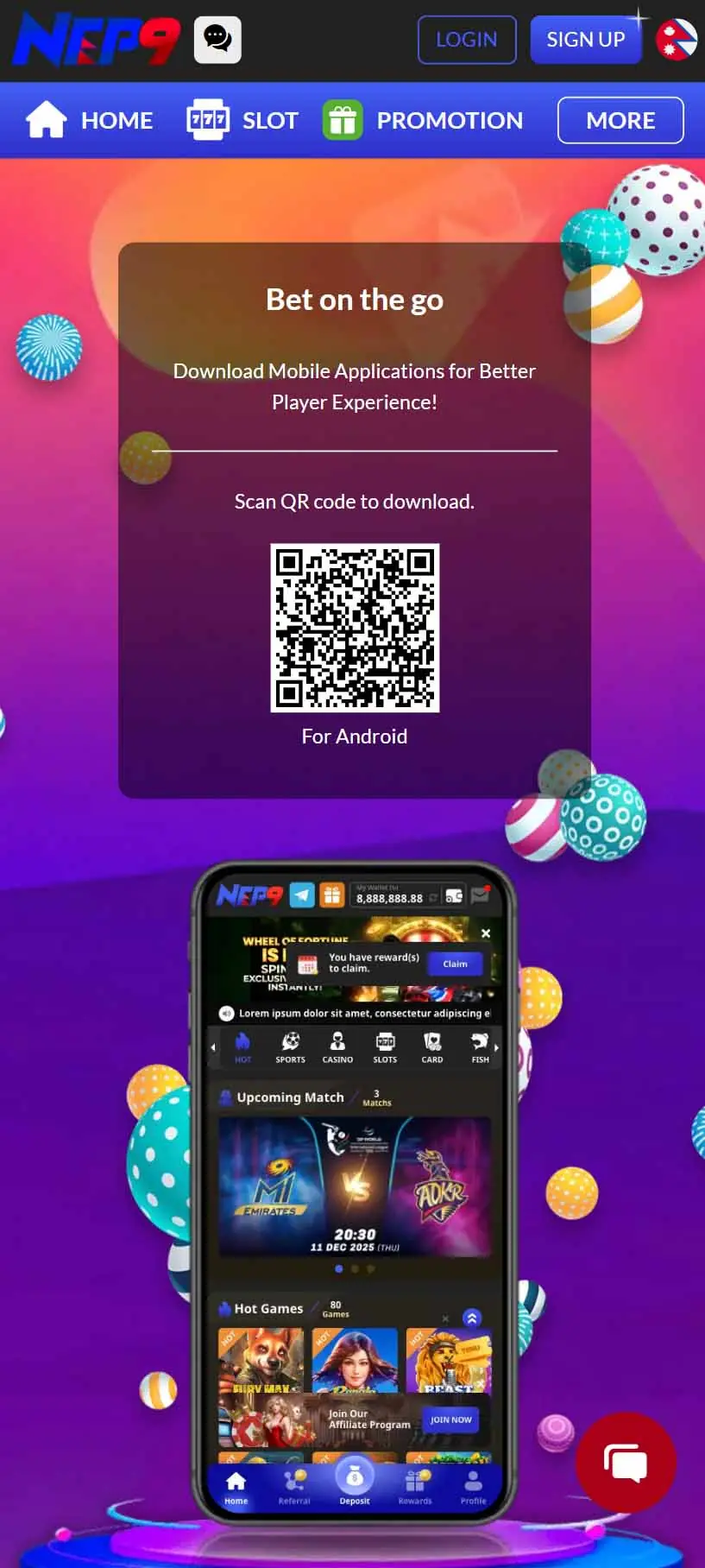
The QR code on the nep9 com download page links directly to the latest APK. Five-step process.
- Scan the QR code or visit the download page. Open your phone camera and point it at the QR. Or visit nep9 com on mobile and tap the App / Download section. If the main domain isn't loading, try nep9 net or any verified backup nep9 link.
- Approve the APK download. Your browser will warn that "this type of file may harm your device." This is the standard non-Play-Store warning — it doesn't mean the file is dangerous. Tap Download or Continue.
- Allow installation from unknown sources (one-time). Android 8+: a settings toggle appears for the specific app (e.g., Chrome) requesting install permission. Enable it, then return to the install screen. Android 7 and older: Settings → Security → Unknown Sources before installation.
- Install and open. Tap Install. The process takes 10–30 seconds. Once installed, tap Open, or find the NEP9 icon on your home screen / app drawer.
- Log in or register. Existing players: tap LOGIN with Account or Mobile (+977) credentials. New players: tap SIGN UP to begin nep9 sign up. Your nep9 register bonus is available from the deposit screen on first deposit.
System Requirements
The NEP9 Android app supports a wide range of devices, but performance varies. If your device is older than 2018 or running Android 6 (Marshmallow) or lower, the website at nep9 com via mobile browser will run more reliably than the app.
Is the NEP9 APK Safe?
The most common question — and it deserves a direct answer.
✓ Downloaded from nep9 com or nep9 net
Yes, the APK is safe. The file is signed by NEP9's developer certificate and contains the same software code as the live website. Your antivirus may flag it simply because it's an APK from outside the Play Store — that's a generic warning, not a virus detection.
⚠ Downloaded from third-party APK sites
Be very cautious. Sites like APKPure, APKMirror and dozens of smaller mirror hosts may carry tampered casino APKs. Tampered versions can capture login credentials, redirect deposits or install spyware alongside the app.
5 Rules for Safe APK Installation
Always start from the QR code on nep9 com or nep9 net. If you got the link from anywhere else, verify it leads to one of those domains before downloading.
Check the URL carefully for typo-squatting (e.g., "nepg9.com" with a swapped letter). Phishing domains often differ from the real site by a single character.
Don't install the APK from an SMS or WhatsApp link unless you can verify it comes from nep9 official channels. Unsolicited download links are a common phishing vector in Nepal.
Keep your phone's Play Protect enabled even after installing — Play Protect scans non-Play-Store apps and will flag genuine threats while ignoring the standard "outside Play Store" warning.
Update through the app itself, not by re-downloading from random sources. The app prompts you to update when new versions are released, and the update file is verified against the same certificate.
Common Issues and Fixes
Six errors cover almost every install / runtime issue. Most fixes are 30 seconds.
"App not installed" error
- Older version conflicting — uninstall it first, then re-install.
- Storage full — free up 200 MB and try again.
- Download corrupted — re-download from nep9 com and retry.
App opens but won't load past splash
- Check internet connection. The app needs network to authenticate.
- Force-close the app and reopen.
- Device date/time wrong — apps using SSL fail when the clock is off. Set time to "automatic" in Android settings.
Login fails inside the app but works in browser
Clear the app's cache: Settings → Apps → NEP9 → Storage → Clear Cache (don't clear data — that wipes saved login). If clearing cache doesn't help, uninstall and reinstall — your account is server-side; nothing is lost.
Games freeze or run choppy
- Close other background apps to free up RAM.
- Switch from mobile data to Wi-Fi (or vice versa — sometimes one is congested).
- Disable battery saver mode while playing — it throttles performance.
Push notifications not arriving
- Check Settings → Apps → NEP9 → Notifications and enable all channels.
- Battery optimization may be killing the app in background. Add NEP9 to "unrestricted" / "no battery optimization" list.
Can't update to the latest version
- Don't install the new APK over a corrupted older version. Uninstall first, then install fresh.
- Confirm you're downloading from the official source — third-party update prompts can be fake.
What Happens After You Install
The app and the website share the same backend, so everything you do reflects on both. But the first time you open the app, six things are worth doing immediately.
- Log in or register. Use existing credentials, or tap SIGN UP to start nep9 sign up. New players: have your phone number ready (Nepal default +977) for verification.
- Enable notifications. When prompted, allow notifications. This unlocks the "passive value" advantage — bonus alerts, tournament reminders and nep9 cashback credit notifications all flow through this channel.
- Complete KYC verification. Unlocks the Rs. 699 verification bonus and ensures smooth withdrawals later. Tap your profile, find the Verification section, and upload a government ID + proof of address. KYC bonus details →
- Claim your welcome bonus. Your one-time nep9 register bonus is waiting on the deposit screen — 299% Welcome (cross-product) or 100% Spribe Aviator Welcome (Aviator-focused). One per account; choose deliberately.
- Activate the Daily Sign-In Challenge. Tap into Promotions → 30 Days Sign-In Challenge → nep9 claim. From this point on, every daily login counts toward milestone payouts.
- Set the app icon where you'll see it. Move NEP9 to your phone's main home screen or even the dock. Out of sight = out of habit = broken sign-in streaks. Affects whether you complete the 30-day challenge.
Frequently Asked Questions About the NEP9 App
Honest answers from real Nepali players about the NEP9 app — performance, safety, multi-device use, language support.
Is there a difference between the app version and the website at nep9 com?
Functionally, no. The app and website connect to the same servers, the same wallet and the same game library. The differences are in user experience: faster loading, push notifications, more reliable session handling and biometric login on the app.
Will the app drain my battery faster?
Less than keeping a browser tab open with the same site. Native apps are more battery-efficient than browser sessions in most cases. Live casino streaming uses more battery than slot play regardless of platform — that's a streaming reality, not an app problem.
How often does the app update?
Major feature updates roll out every 1–3 months. Minor patches and new game additions happen more frequently in the background. The app prompts you when an update is available — accept it. Out-of-date versions may eventually lose access to newer features.
Can I have the app on multiple devices?
Yes. Install the APK on as many Android devices as you want, log in with the same account on each, and your balance and bonuses sync. Note: simultaneous active gameplay across multiple devices may be flagged by anti-fraud systems on certain bonus terms — when in doubt, log out of one before playing on another.
Does using the app affect my eligibility for any bonuses?
No. Every promotion — nep9 promo offers, nep9 cashback, nep9 100 free campaigns, the welcome bonus, the sign-in challenge, the slot tournament — applies equally to app and website users. Your access route doesn't change your eligibility.
What if NEP9 releases a new APK and I'm still on the old one?
The app prompts you when updates are available. You can also manually re-download from nep9 com any time. Your account credentials and wallet aren't affected by app reinstalls — those live on NEP9's servers, not on your phone.
Is the app available in multiple languages?
Yes — Nepali and English are supported, and the app remembers your language preference between sessions.
Can I use the app to participate in the affiliate program?
You can track referrals, view commission and access your unique nep9 link through the app. For full nep9 agent / nep9 affiliate dashboards (with marketing material downloads, sub-affiliate management), the desktop version typically offers a more complete interface. Affiliate program details →
I uninstalled the app by mistake. Will I lose my balance and bonuses?
No. Your account, wallet, KYC status, nep9 vip tier, sign-in streak, accrued cashback and pending bonuses all live on NEP9's servers. Reinstall the app, log in, and everything is exactly where you left it.
My phone is asking if I trust NEP9 as a developer. What do I tap?
This is a one-time prompt the first time you install. Tap Trust (or Allow). It's the standard Android process for any non-Play-Store APK. You can revoke trust later in Settings if you uninstall the app.
Can I sideload the APK on an Android tablet or Android TV?
Yes for tablets — the app scales to tablet screens, though it's optimized for phone aspect ratios. Android TV is technically possible but not recommended; the UI isn't designed for remote-control navigation.
Why does the app ask for permissions like phone state, storage and location?
Storage: to cache game assets and screenshots.
Phone state: to maintain session continuity during incoming calls.
Location: for region-specific promotions and regulatory compliance.
You can review and revoke any permission later in Settings → Apps → NEP9 → Permissions.
The App Is Free — the Habits Are Where the Value Lives
Installing the nep9 apk takes 60 seconds. The real value comes from how you use the app afterward — opening it daily, allowing the bonus notifications, logging in for the sign-in streak, and treating it like the gateway to the platform's full reward stack.
Three takeaways for new app users:
1. Download only from nep9 com or nep9 net — never from third-party APK sites or unsolicited links.
2. Allow notifications — that's where bonus alerts, tournament reminders and nep9 cashback updates arrive.
3. Place the app icon where you'll see it daily — the 30 Days Sign-In Challenge alone is worth NPR 72,000 across a full cycle, and missing days resets the streak.
If you're on iOS, the PWA workflow above (Safari → Share → Add to Home Screen) gives you ~95% of the app experience without an App Store install. The remaining 5% is just push notification depth, and that's something Apple's policy controls — not NEP9.
For Android players: scan the QR code on the nep9 com download page, install, log in, and you're set up for the smoothest possible nep9 bet experience the platform offers. Your next nep9 win could be one tap away. Play responsibly →
Scan, Install, Play
Visit the official NEP9 download page, scan the QR with your Android phone, and the APK installs in under a minute.